
Our Blacklist Vigilance tool monitors your domain and IP reputation across 200+ Real-time Blackhole Lists (RBLs) to protect your email deliverability. We provide instant alerts when you’re flagged, identify which RBL listed you, and access direct delisting links; all before blacklisting damages your sender reputation and business operations.
How to Set Up Blacklist Vigilance #
- Navigate to Blacklist Vigilance from the sidebar menu
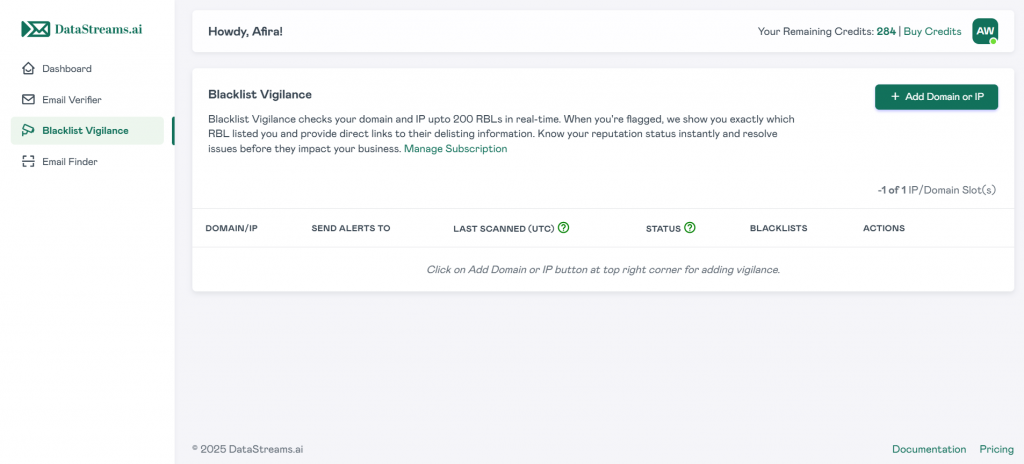
- Click the “+ Add Domain or IP” button in the top right corner
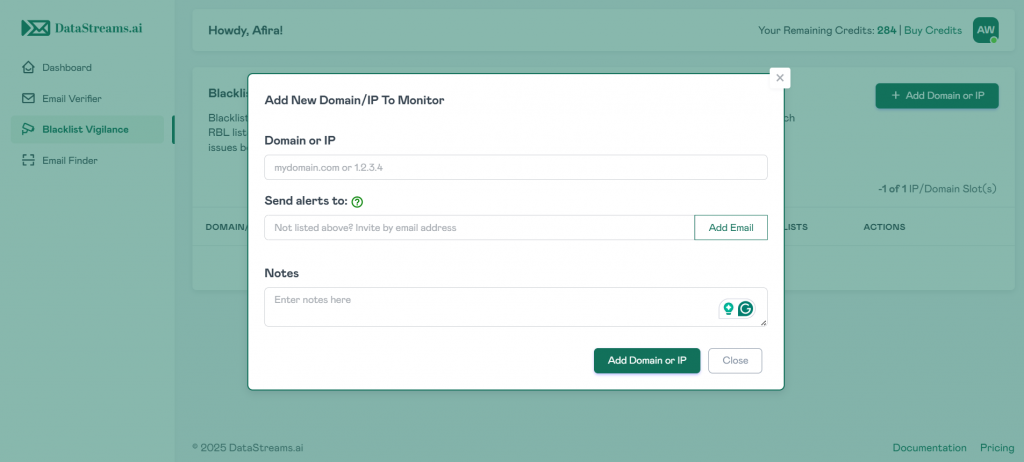
- In the “Add New Domain/IP To Monitor” dialog box, complete the following fields:
- Domain or IP: Enter your domain (e.g., yourdomain.com) or IP address (e.g., 123.45.67.89) in the input field
- Send alerts to: Enter the email address where you want to receive blacklist notifications and click “Add Email” to include additional recipients for alert distribution
- Notes (Optional): Add internal notes or context about this domain/IP for your team’s reference
- Click “Add Domain or IP” to activate vigilance
4. The system displays “Awaiting Scan” status in the Actions column
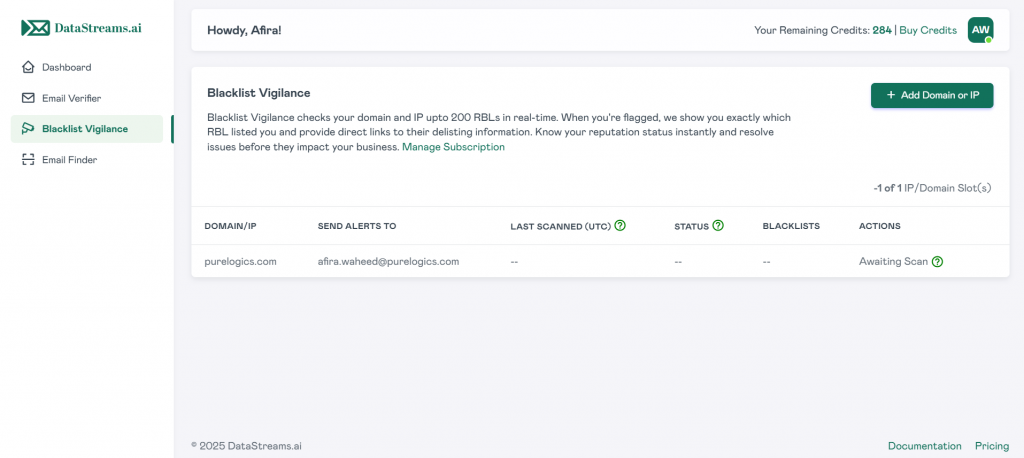
Processing Time: New domains and IPs are scanned within 30-60 minutes of being added to Blacklist Vigilance.
Understanding Your Blacklist Vigilance Dashboard #
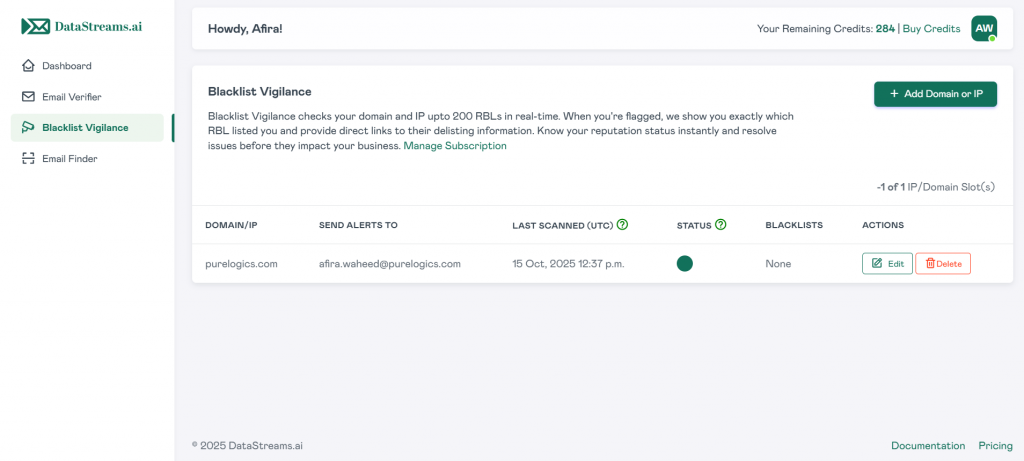
Once your scan completes, the dashboard displays the following information for each monitored asset:
- Domain/IP: The domain name or IP address under vigilance
- Send Alerts To: Email addresses configured to receive blacklist notifications
- Last Scanned (UTC): Timestamp of the most recent RBL check across all 200+ blacklists
- Status: Current reputation state with real-time classification displayed as a colored indicator
- Blacklists: Number of RBLs where your domain or IP is currently listed (displays “None” when clean)
- Actions: Available options including Edit and Delete for managing your vigilance settings
Understanding Your Status Results #
- Awaiting Scan (Pending Indicator)
Initial scan is in progress. Blacklist Vigilance is checking your domain or IP against all 200+ RBLs in our network. The “LAST SCANNED” column will show “–” until the first scan completes.
- Clean Status (Green Indicator)
Your domain or IP passes all RBL checks with no blacklist placements detected. The green status indicator confirms a healthy sender reputation with minimal deliverability risk. The “BLACKLISTS” column will show “None” when your reputation is clear.
Recommended Action: Continue vigilance. Maintain current sending practices and email hygiene standards.
- Flagged Status (Red Indicator)
Your domain or IP appears on one or more blacklists. The status displays a red indicator, and the “BLACKLISTS” column shows the number of RBLs where you’re currently listed.
Click on the entry to view exactly which RBLs have flagged you, along with direct links to their delisting procedures and detailed information about why you were listed.
Recommended Action: Review the specific RBL listings immediately. Follow the provided delisting links to begin reputation recovery. Investigate the root cause (compromised accounts, spam complaints, authentication issues) to prevent future listings.
Managing Your Vigilance Settings #
For each monitored domain/IP in your dashboard, you have the following management options in the ACTIONS column:
Editing Vigilance Settings #
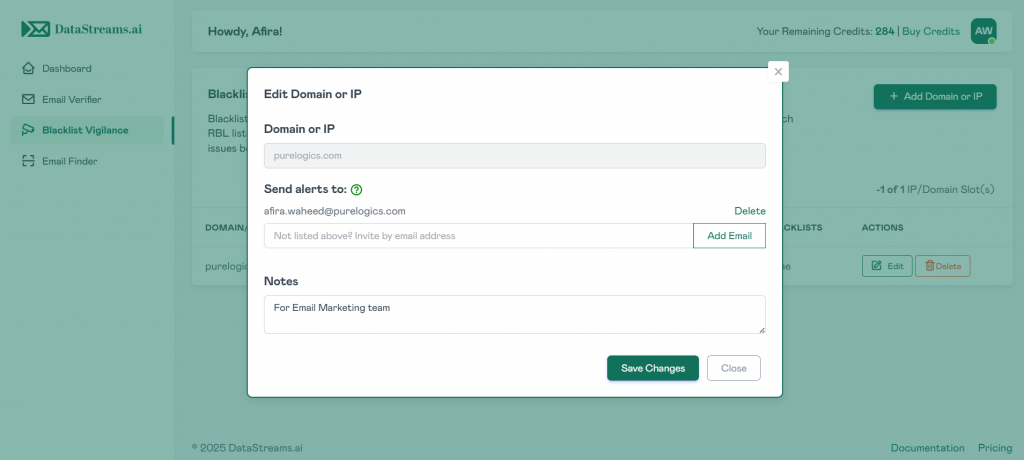
- Click the Edit button next to the domain or IP you want to modify
- Update the alert email addresses by adding or removing recipients
- Modify the notes field to reflect current context or team information
- Click “Save Changes” to apply your updates
Removing Assets from Vigilance #
- Click the Delete button next to the domain or IP you want to remove
- Confirm the deletion when prompted
- The domain or IP will be removed from Blacklist Vigilance, freeing up a subscription slot
Note: Deleting an asset permanently removes its scan history and stops all future alerts for that domain or IP.
Alert Notifications #
When your domain or IP gets flagged on any RBL, Blacklist Vigilance automatically sends email alerts to all configured recipients. These notifications include:
- Which RBL(s) detected your domain or IP
- When the listing was discovered
- Direct links to delisting procedures
Configure multiple alert recipients to ensure your team can respond quickly to reputation threats, even outside business hours.


